

Why 3D Scans Matter In Projection Mapping
{{actual_date_posted}}
Why 3D Scans Matter In Projection Mapping
Great projection mapping looks effortless. Content hugs every contour, lines match masonry joints, and motion flows across complex shapes without drifting. That level of precision does not happen by eye. It starts with a reliable digital twin of the space. A 3D scan gives you that ground truth.
Below, we explain what 3D scanning is, why it improves both quality and speed, and how it fits into a modern projection mapping workflow. The goal is to make the topic clear for non-technical readers and useful for technical teams planning their next installation.
What a 3D scan actually is
A 3D scan is a measured capture of a real surface. The scanner records millions of points in space, each with an exact position and often a color. Those points form a point cloud that can be turned into a polygon mesh. Common capture methods include tripod laser scanning, mobile or handheld LiDAR, photogrammetry from calibrated photos, and drone-based scanning for facades and rooftops.
The output is a scaled digital model. File types you will see include E57 or PLY for point clouds, and OBJ or FBX for meshed geometry. Once you have that model, you can measure distances, see true curves and relief, and align graphics to the real object before a projector ever turns on.
Why scanning changes the outcome
It removes guesswork from geometry
Projection mapping fails when the virtual canvas does not match the physical surface. A scan shows the true shape, not a sketch or an assumption. You see every cornice, pilaster, weld seam, and curve. That means masks fit, edges meet, and illusions land where the eye expects them to.
It speeds up creative production
Designers can texture the scanned mesh, unwrap UVs, and preview animation on the real geometry in the content tools they already use. Artists avoid rework because they are painting on the correct shape from day one. You save on-site corrections and late night re-renders.
It improves technical planning
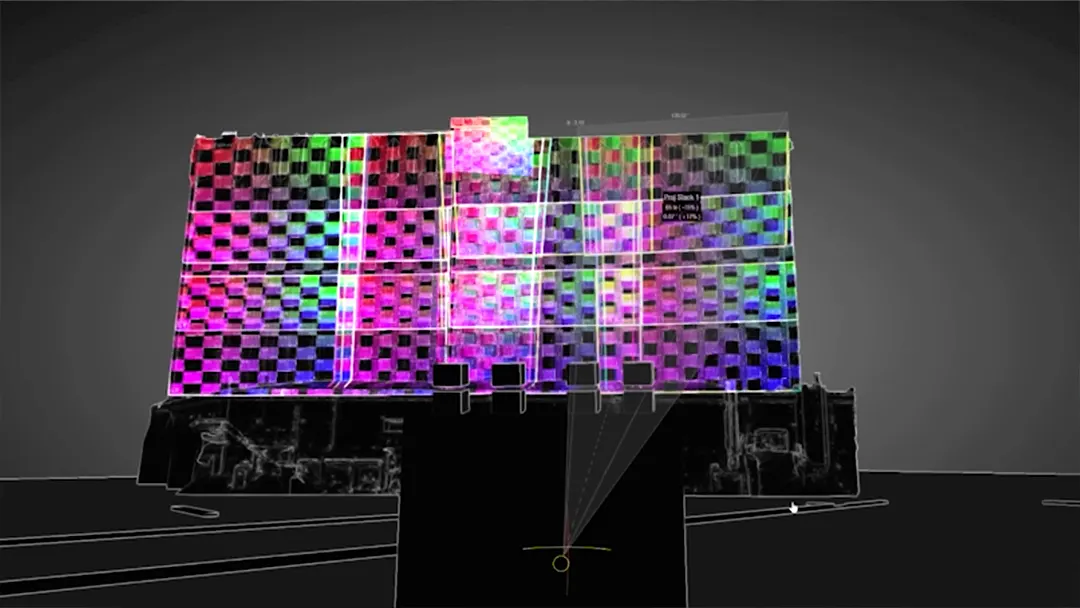
With a scaled model, you can test projector positions, throws, and lenses in software, confirm coverage, and predict pixel density on every part of the surface. You can estimate brightness by area and plan overlaps for blends. That reduces surprises and prevents last-minute compromises.
It makes calibration easier
Auto-alignment systems and media servers solve faster and more accurately when their internal model matches reality. Even if you finish with manual tweaks, starting from a clean 3D reference shortens the last mile.
Where 3D scans deliver the most value
For perfectly flat rectangles, a full scan may be unnecessary. Simple field measurements and a quick survey can be enough. As soon as the surface becomes irregular or the coverage is panoramic, scanning pays for itself.
- Historic or sculptural facades. Stone relief, columns, and deep reveals need precise masks and content that follows the architecture.
- Sculptures and sets. Freeform shapes are hard to measure with a tape measure. A scan captures the form in minutes and gives artists something solid to work on.
- Domes and curved rooms. Cylinders, spheres, and compound curves benefit from accurate meshes for warping and blend studies.
- Tight timelines and high-stakes shows. When load-in windows are short or the venue cannot accommodate long after-hours alignment, scanning pulls hours of trial and error into preproduction.
How a scan fits into the mapping workflow
- Site capture. We choose the right method for the space. Tripod laser scanners for millimeter level accuracy, handheld LiDAR for fast interiors, and photogrammetry or drone passes for tall facades and roofs. We place registration markers when needed and plan the path so we see every surface from multiple angles.
- Registration and cleanup. Multiple passes are aligned into one coordinate system. We trim stray points, remove people or vehicles captured in motion, and decimate very dense data to a size that is efficient but still accurate.
- Meshing and UVs. The point cloud becomes a watertight mesh where possible. We generate UVs so that content can be painted directly onto the geometry. For some jobs, we preserve the point cloud and drive mapping from that if meshing would introduce rounding errors.
- Previsualization. The scaled model moves into our previz and mapping tools. We test projector locations, lens options, and blends, then export masks and warps to the media server or projector.
- Content production. Artists build animation and interactive elements on the same mesh, so final frames already match the real surface.
- Onsite alignment. With measurements and masks in hand, we position the hardware, run auto-alignment where appropriate, and finish with manual mesh tweaks. Because the virtual and physical canvases already agree, the onsite phase is shorter and cleaner.
Planning and design advantages
- Lens and throw selection. The scan gives exact throw distances and image sizes for each potential rigging point. That helps you pick the correct lens family, avoid extreme zoom losses, and keep beams out of sightlines.
- Sightlines and occlusions. You can see where truss, speakers, or architecture will block light and adjust placements early.
- Pixel density planning. Knowing the surface area and viewing distance, you can decide where 4K is necessary and where WUXGA is sufficient, and when to deploy different projectors to balance clarity, brightness, and budget across the space.
- Blend strategy. Overlap zones can be placed where they are least visible and where content will hide them.
- Safety and logistics. Accurate heights and clearances inform lift access, rigging loads, and cable runs before you arrive on-site.
Creative advantages
- Perfect edges. Content can trace architectural lines and seams with confidence.
- Trompe-l'oeil and depth tricks. With true geometry, you can create illusions that appear to reshape the surface.
- Consistent parallax. Camera moves and perspective effects read correctly from intended viewing zones.
- Asset reuse. Once captured, the model becomes a reusable asset for seasonal shows or touring versions.
Accuracy, formats, and scale
Accuracy depends on the tool and the workflow. Tripod laser scanners can capture at the millimeter scale under the right conditions. Handheld LiDAR and photogrammetry commonly deliver centimeter-level accuracy when properly registered. For projection mapping, both levels are useful. Large facades typically do not require sub-millimeter meshes everywhere, but key features like cornice lines and sculpture faces benefit from higher density.
We typically deliver a clean, scaled mesh in OBJ or FBX, plus the original E57 or PLY point cloud for archive. We include notes on coordinate origin, units, and orientation so every team works in the same space. If your content pipeline uses UDIMs or specific texture layouts, we can UV the model to match.
Common pitfalls and how to avoid them
- Reflective or transparent materials. Mirrors, glass, and polished metals confuse many scanners. We plan additional angles, use cross-polarized photography for photogrammetry, or mask those regions for manual treatment in content.
- Moving elements. Trees, flags, or LED walls change between passes. We capture quickly and schedule scans when movement is minimal.
- Occlusions. Deep recesses and undercuts need extra angles. A single pass rarely sees everything. We plan coverage so every nook is visible in multiple frames.
- Scale drift. Photogrammetry must be anchored to known dimensions. We place scale bars or measure reference spans with calibrated tools.
- Oversized meshes. Ultra-dense models can bog down content tools. We keep a master mesh at full resolution and provide decimated versions for production, keeping detail where it matters.
How scanning reduces onsite time
Every hour spent guessing with grids and tape measures during load-in is an hour you are not being productive. A good scan moves that effort upstream. Masks, warps, and lens choices are ready before the truck doors open. Onsite, you set hardware, run the first alignment pass, and fine-tune. That keeps crews on schedule and protects show quality when review windows are short.
A short checklist to decide if you should scan
If you are projecting a simple rectangular image on a flat screen, a measured drawing and a quick test are usually sufficient. If the surface is planar but very large, a basic laser rangefinder survey, a few photos, and careful planning can still get you home. As soon as content must wrap edges, follow relief, or span multiple curved surfaces, scanning moves from nice to have to necessary.
- Is the surface irregular, curved, or heavily detailed?
- Will content trace architectural lines or product edges?
- Are timelines tight with limited overnight access?
- Do you expect to repeat the show seasonally or tour versions?
- Do you need to test multiple projector placements or lens options in advance?
If you answered yes to any of these, a 3D scan will likely save time and improve the final result.
Privacy, access, and coordination
Scanning collects detailed geometry. Treat that data with care. Secure storage, limited distribution, and clear agreements with venue owners are part of a professional workflow. Plan access windows for exterior scans, coordinate with building management, and align on lift use or drone permissions early. Good coordination keeps capture safe and respectful of operations.
How Lumen and Forge uses 3D scans
We scan before we draw. Our team selects the right capture method for the site, registers and cleans the data, and delivers a production-ready mesh that drops directly into our media server and content tools. We use that same model to study projector placements, choose lenses, plan blends, and estimate brightness. On-site, the alignment process is faster because the virtual and physical canvases already agree.
The result is consistent. Edges are crisp, blends are clean, and the story stays locked to the surface from the front row to the back of the room.
Turn the real world into a reliable canvas
Projection mapping lives or dies on alignment. A 3D scan gives you the accuracy to design with confidence, the speed to hit tight schedules, and the flexibility to iterate without guesswork. If you are planning a dome, a wraparound room, a sculptural set, or a building facade, start with a measured model. It will make every decision that follows easier.
If you want help choosing the right capture approach and integrating scans into your mapping workflow, Lumen and Forge can scope the site, deliver the digital twin, and carry it through to a calibrated, seamless show.